
Install the Charmius Casino App in Seconds
No APK files. No app store approval. No waiting. Our PWA installs straight from your browser in under a minute, and the moment it lands on your screen, you get 20 free spins — no deposit required. The Charmius Casino mobile app runs on Android, iOS, Windows, and macOS, giving you full access to pokies, live tables, crash games, and your cashbox from any device, any time.
What Makes Our PWA Different From a Standard App
Most mobile casinos either push you through an app store or ask you to sideload an APK file — neither of which is particularly smooth. We took a different approach. The Charmius Casino mobile app is a Progressive Web App (PWA), which means it installs directly from your browser without touching the App Store or Google Play.
There are no file permissions to wrestle with, no storage-heavy downloads, and no version updates to manually trigger. The app updates itself silently whenever you open it. For a full list of supported browsers and operating system requirements, the Charmius app requirements overview covers every compatible configuration in detail.
What you do get is a clean, native-feeling interface that behaves exactly like a standard app once it’s on your home screen or desktop. One icon, one tap, instant load. The underlying tech runs on SSL encryption and GDPR-compliant data handling, so every session is protected at the browser level — the same standard that applies to the full desktop experience.
Your 20 Free Spins Just for Installing — No Deposit Needed
Installing the Charmius Casino app comes with a tangible reward. Once you’ve placed the app on your device and logged into your account, head to Profile → Bonuses to activate your 20 free spins. They’re credited automatically — no code required.
Here’s what you need to know about the bonus terms:
| Detail | Value |
| Free Spins | 20 FS (no deposit required) |
| Bet Value per Spin | 0.10 AUD |
| Wagering Requirement | x40 |
| Maximum Payout | 75 AUD |
| Activation | Profile → Bonuses |
| Eligibility | First install only, one per account |
This is a one-time offer tied to your first installation. If you’ve already installed and missed it, check the Available tab in your Bonuses section — it may still be waiting. The wagering requirement of x40 applies, meaning only bets placed in Bonus Wagering-eligible pokies count toward clearing it. Maximum bet counting toward wagering is 7.50 AUD per spin, so staying within that keeps your progress on track.
Licensed and Secured: Tobique Commission, SSL, and GDPR
Trust is earned with specifics. Our platform operates under Licence No. 0000181, issued by the Tobique Gaming Commission under the Tobique Gaming Act 2023. This is an active gaming licence with a structured ADR process — if a dispute arises and we can’t resolve it directly, it escalates to EGIS (a CGA-certified, independent dispute resolution body) within four weeks.
Your connection to us is protected by TLS 1.2 and AES 256-bit encryption at all times. We don’t sell or share your personal data outside of authorised service providers who operate under strict confidentiality agreements. If you prefer to access your account without installing the app, Charmius Casino browser version details explains exactly how the full-browser experience works and what differs from the installed PWA.
GDPR compliance means you hold clear rights over your data — including access, erasure, and the ability to opt out of marketing at any point via your Profile settings. Security isn’t a background feature here; it’s built into the structure of how we operate.
How to Install on Android via Chrome
Android installation takes four steps. Open Chrome, navigate to our site, tap the three-dot menu next to the address bar, and select “Install the Charmius Casino App.” A prompt appears — press Install, and the icon drops to your home screen within seconds.
For a full walkthrough with screenshots of each step, the Charmius app download guide covers the Android process in detail, including what to do if the install prompt doesn’t appear automatically.
Once installed, the Charmius Casino app behaves identically to a native app — full-screen mode, no browser chrome, direct access to Casino, Live Casino, Promotions, and Cashbox. Your login session persists between uses, so you won’t need to re-enter credentials every time you open it. Chrome is the required browser on Android; the installation prompt will not appear in other Android browsers, so make sure you’re using Chrome before attempting it.
Getting Set Up on iOS via Safari
Installing on iPhone or iPad works through Safari — not Chrome. Open Safari, visit our site, tap the Share icon at the bottom of the screen, and choose “Add to Home Screen.” The icon appears on your home screen immediately.
The Charmius app AU installation on iOS is genuinely frictionless. There’s no App Store listing to find, no region restrictions to work around, and no account required before installing. That said, you’ll need to be logged in before you can activate the 20 FS no-deposit bonus in Profile → Bonuses.
Keep in mind that iOS only supports PWA installation via Safari. If you try the same process in Chrome or Firefox on iOS, the “Add to Home Screen” option either won’t appear or won’t create a proper PWA shortcut. Safari is the correct path every time. Once installed, the app runs in standalone mode — no browser bar, no navigation clutter, just the full casino interface.
Installing on Windows and macOS
Desktop installation brings the full experience to your PC or Mac without opening a browser tab every session. On Windows, open Chrome, visit our site, and click the install icon that appears in the upper-right corner of the address bar. Press Install in the confirmation window, and the app is added to your taskbar and Start Menu.
On macOS, the process runs through either Safari or Chrome. In Safari, click the install icon in the browser panel, then use the Share icon to select “Add to Dock.” Confirm by pressing Add. Chrome on macOS follows the same process as Windows.
If you run into any issue during installation — such as the install icon not appearing or the app failing to launch — Charmius Casino app not working help walks through the most common causes and fixes. The macOS version is the only platform where two browsers are supported; on every other operating system, stick to the primary recommended browser for a clean install.
Everything in the App: Pokies, Live Casino, Crash Games, and Jackpots
The game library accessible through our Charmius mobile casino is the same catalogue you’d find on desktop — 3,000+ titles, all loading at native speed with no quality reduction. Pokies make up the bulk of it, with categories spanning Top, New, Bonus Wagering, Jackpot, Bonus Buy, and Megaways.
Some of our most played pokies through the app include:
- Golden Bull (KA Gaming) — consistently one of our top performers by session volume
- Bonanza Trillion (BGaming) — Megaways mechanics with deep bonus potential
- Fruit Million (BGaming) — a high-frequency classic in the fruit pokies category
- Lucky Jane in Egypt (1spin4win) — book-style feature with expanding symbols
Beyond pokies, our live casino section runs across eight providers including Winfinity (68 games), Imagine Live (60 games), and Iconic21 (47 games). Roulette, blackjack, baccarat, and game shows like Lucky Wheelionaire and Wonder Wheel are all available in full through the app. Crash game fans can also jump straight to titles like Rocketoo (Galaxsys), Dragon’s Crash (BGaming), and Ninja Crash (Galaxsys) without switching to a browser. The Charmius Casino mobile app renders every game category without compromise.
Your Welcome Package — Up to 2,000 AUD and 100 Free Spins
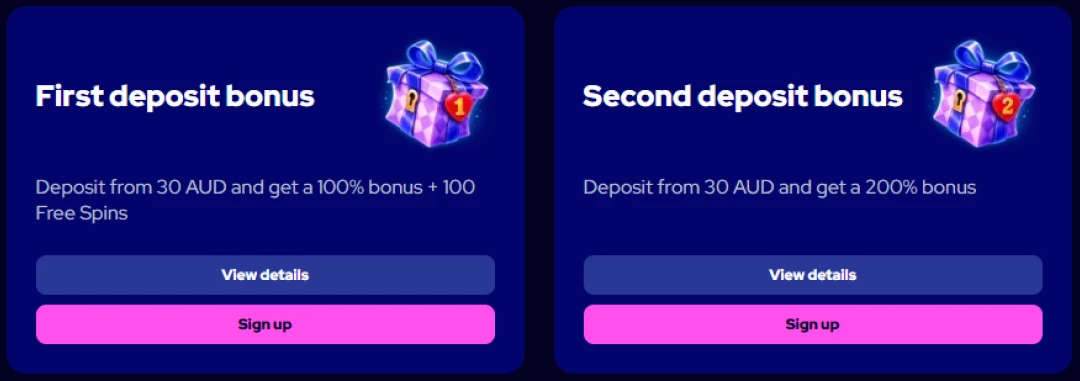
New accounts qualify for a two-deposit welcome package worth up to 2,000 AUD plus 100 free spins. Everything is accessible from the moment you register and make your first deposit through the app.
Before depositing, check Charmius registration steps if you’re setting up a new account — the process takes under two minutes. Once your account is active, here’s how the Charmius Casino app welcome offer breaks down:
| Deposit | Bonus | Free Spins | Min. Deposit | Wagering |
| 1st | 100% up to 1,000 AUD | 100 FS (20/day for 5 days) | 30 AUD | x40 |
| 2nd | 200% up to 1,000 AUD | — | 30 AUD | x40 |
The 100 free spins from the first deposit are delivered as 20 spins per day across five days in selected pokies — Allways Egypt Fortune, Hotfire Diamonds, Way Of Honor Hold And Win, Hotfire Coins, and Lady Wolf Moon. Maximum win from those spins is 300 AUD. Select your bonus in Cashbox before depositing to ensure it’s credited automatically.
Built to Perform: Speed, Single Login, and Full Cashbox Access
One thing players consistently flag at other mobile casinos is sluggish load times and the need to log in repeatedly. We built around both of those pain points. The Charmius online casino app uses PWA caching technology, which means the core interface loads in fractions of a second after the first visit — it stores what it needs locally, so subsequent opens are near-instant.
Authentication is handled once. Log in via Charmius Casino login details when you first set up the app, and your session persists across opens. You won’t be pushed to a login screen every time you tap the icon.
From inside the app, your entire account is accessible:
- Cashbox — deposit, withdraw, and review your full transaction history under Operations History
- Profile → Bonuses — check Available and Active bonuses in real time, including your weekly cashback and free spins queue
- Profile → Limits — set or adjust deposit limits, loss limits, and cooling-off periods without switching to a desktop browser
- VIP Club — monitor your XP and SP progress, track level-up rewards, and access VIP-exclusive promotions
Withdrawal requests submitted through the app are reviewed within 24 hours, with payment provider processing taking up to 3–5 business days depending on the method used.
Playing Responsibly: Limits, Cooling Off, and Self-Exclusion
Our responsible gaming tools are fully accessible inside the app through Profile → Limits — no need to open a browser or contact support for most of them. We built these features to be easy to find because that matters.
Here’s what’s available:
- Deposit limit — set a daily, weekly, or monthly cap; reductions take effect immediately
- Loss limit — caps your net losses (calculated as bets minus wins) over a chosen period
- Cooling-off period — a 24-hour pause on deposits and betting, activated via Profile or live chat; withdrawals remain accessible during this time
- Self-exclusion — blocks account access for a defined period (1 day, 1 week, 2 weeks, 1 month, 3 months, or indefinitely)
Increasing or cancelling a limit takes up to 24 hours to take effect — a built-in buffer designed to prevent impulsive changes. If you need external support, organisations including Gambling Therapy, Game Care, and Gamblers Anonymous are available to Australian users. As a Charmius real money mobile casino, we take our obligations around player safety seriously. You must be 18 or older to register and play, and we recommend Gamban or Net Nanny for household devices used by minors.
Frequently Asked Questions About Our App
Does the Charmius app require an APK download on Android?
No APK is needed. Install directly through Chrome by tapping the three-dot menu and selecting the install option. The process takes under a minute with no file downloads involved.
Can I claim the 20 free spins if I already have an account?
The 20 FS no-deposit bonus is tied to the first installation of the app on your device. If your account is new and you’ve just installed, activate it in Profile → Bonuses.
Which browsers support the PWA installation on desktop?
On Windows, use Chrome. On macOS, both Safari and Chrome work. The install icon appears in the browser address bar once you visit our site in a supported browser.
Are all pokies and live games available through the mobile app?
Yes. The full catalogue of 3,000+ games — including pokies, live casino tables, crash games, jackpot titles, and Megaways slots — is available through the app without any restrictions or quality reduction.